The Ultimate Video Format Guide: Codecs and Containers Explained
Unlock the secrets of video formats, codecs (H.264, HEVC), and containers (MP4, MOV, MKV). Master video compression and quality for professional results.
Table of Contents
In the digital age, video content reigns supreme. Whether you are a content creator, a video editor, or just someone trying to upload a clip to social media, you’ve likely encountered a confusing array of file extensions: MP4, MOV, AVI, MKV. These are more than just letters; they represent complex structures that dictate how your video looks, sounds, and performs. Understanding the difference between a video format guide, a container, and a codec is crucial for achieving optimal quality, minimizing file size, and ensuring compatibility across different devices.
This comprehensive guide will demystify the technical jargon, explaining the relationship between codecs (like H.264 and HEVC) and containers, and helping you choose the best settings for your specific needs. Ready to master the fundamentals of video compression and delivery? Let’s dive in.
The Essential Difference: Containers vs. Codecs
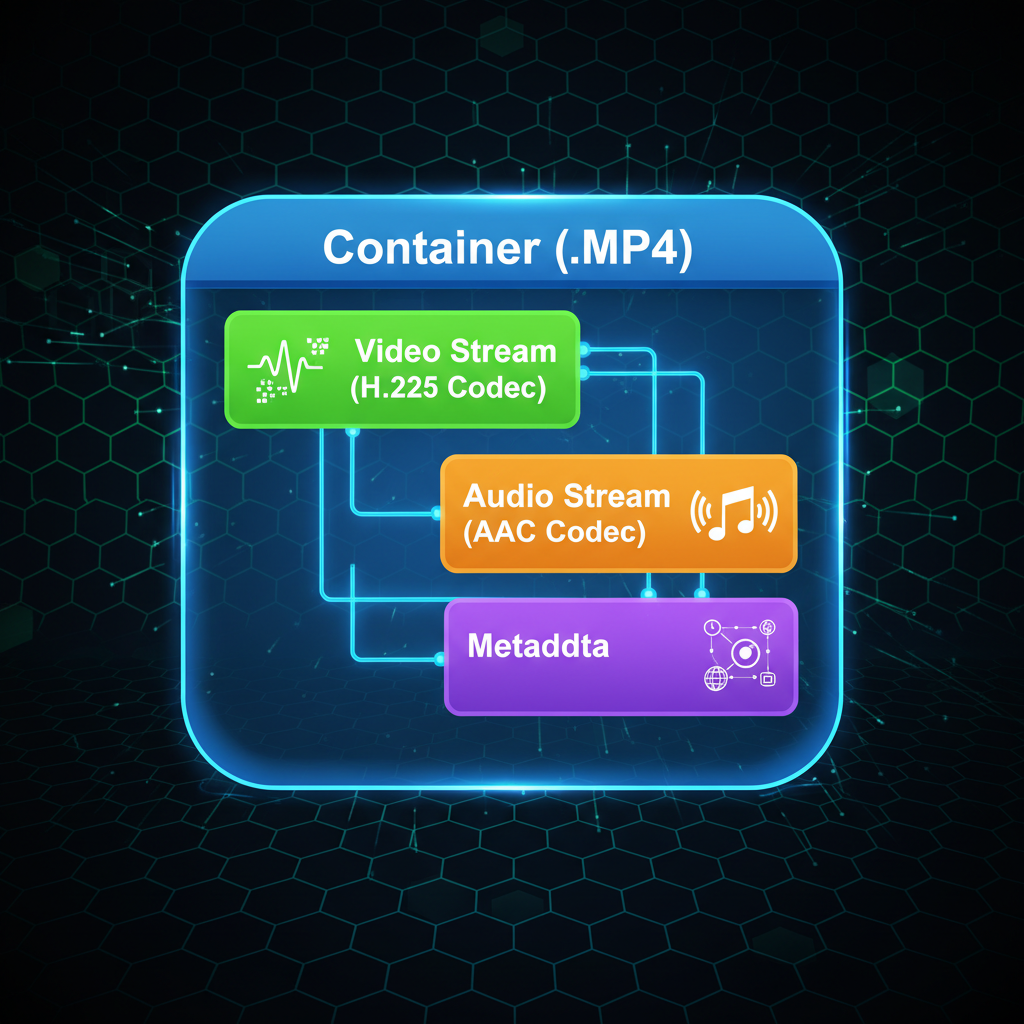
Before exploring specific file types, it’s vital to understand the two main components of a video file: the container and the codec. Think of the container as the box and the codec as the method used to package the contents inside that box.
What is a Video Container (Format)?
The video container, often identified by the file extension (e.g., .mp4, .mov), is a wrapper that holds all the necessary data streams together. This includes the compressed video data, the compressed audio data, metadata (like frame rate and aspect ratio), and sometimes subtitles or chapter information. The container defines the structure and synchronization of these elements.
- .MP4 (MPEG-4 Part 14): The most universally compatible container. It supports a wide range of codecs and is the standard for web streaming and mobile devices.
- .MOV (QuickTime File Format): Developed by Apple, often used in professional editing environments, especially on macOS.
- .MKV (Matroska Multimedia Container): Known for supporting multiple audio and subtitle tracks, often favored for high-definition video archiving.
- .AVI (Audio Video Interleave): An older Microsoft standard. While widely compatible, it often results in larger file sizes and lacks support for modern compression techniques.
What is a Video Codec? The Engine of Compression
The codec (short for Coder-Decoder) is the algorithm used to compress and decompress the video and audio data. Since raw video files are enormous, codecs are essential for making video manageable for storage and transmission. The codec determines the actual quality and file size.
- Encoding: Compressing the video data into a smaller size.
- Decoding: Decompressing the data for playback.
Choosing the right codec is critical for balancing quality and file size, impacting everything from upload speeds to storage costs. This is central to mastering video compression.
Deep Dive into Major Video Codecs (H.264 vs. HEVC)
While many codecs exist, two dominate the current digital landscape, defining modern standards for high-quality video delivery.
H.264 (MPEG-4 AVC)
H.264, or Advanced Video Coding (AVC), is the workhorse of digital video. Introduced in the early 2000s, it offers excellent compression efficiency and near-universal compatibility. Almost every device, browser, and streaming platform supports H.264 playback, making it the safest choice for broad distribution.
- Pros: Maximum compatibility, relatively low processing power needed for decoding.
- Cons: Less efficient than newer standards, especially at 4K resolutions.
- Best Use Case: Web streaming (YouTube, Netflix), mobile video, and general distribution where compatibility is paramount.
HEVC (H.265)
High Efficiency Video Coding (HEVC) is the successor to H.264. As the name suggests, it offers significantly better compression efficiency—up to 50% smaller file sizes at the same quality level compared to H.264. This efficiency is crucial for handling demanding formats like 4K and 8K video.
- Pros: Superior compression, essential for 4K and HDR content, better quality retention at lower bitrates.
- Cons: Requires more processing power for encoding and decoding, and compatibility is still growing, though rapidly improving.
- Best Use Case: High-resolution content delivery, archival storage, and environments where bandwidth is limited.
AV1 and VP9: The Open-Source Contenders
The landscape is also shaped by open-source codecs:
- VP9: Developed by Google, VP9 is widely used by YouTube and is a strong competitor to HEVC, often offering similar efficiency.
- AV1 (AOMedia Video 1): A royalty-free codec backed by industry giants (Google, Amazon, Apple, Netflix). AV1 promises even greater efficiency than HEVC and is rapidly becoming the future standard for high-quality streaming, especially for 8K content.
Choosing the Right Format for Specific Platforms
The platform you intend to use dictates your final format choice. A file optimized for professional editing is vastly different from one optimized for social media streaming.
1. Professional Editing and Archiving
For editing, quality preservation is key. Editors often use intermediate codecs that are less compressed and easier for editing software to process, even if the file sizes are massive.
- Codecs: ProRes (Apple), DNxHR (Avid). These codecs maintain high fidelity and color information, minimizing generational loss during complex editing workflows.
- Containers: .MOV, .MXF.
2. Web and Streaming Distribution
When uploading to platforms like YouTube, Vimeo, or your own website, the goal is maximum compatibility and efficient streaming.
- Recommended Codec: H.264 (for broad compatibility) or HEVC/VP9 (for 4K content).
- Container: .MP4 is the undisputed standard.
- Key Setting: Use a Variable Bitrate (VBR) to optimize file size without sacrificing quality during complex scenes.
3. Social Media (Instagram, TikTok)
Social platforms have strict limitations on file size and duration, and they re-compress everything. You need a format that minimizes quality loss during this secondary compression.
- Recommended Codec: H.264.
- Container: .MP4.
- Tip: Export at the highest quality the platform allows (often 1080p or 4K) to give the platform’s compression algorithm the best source material to work with.
Mastering Video Bitrate and Resolution
Understanding codecs is only half the battle; you must also manage bitrate and resolution, which directly influence the final quality and file size.
Resolution
Resolution refers to the number of pixels in the frame (e.g., 1920x1080 for 1080p, 3840x2160 for 4K). Higher resolution means sharper detail but exponentially larger file sizes.
Bitrate (The Quality Slider)
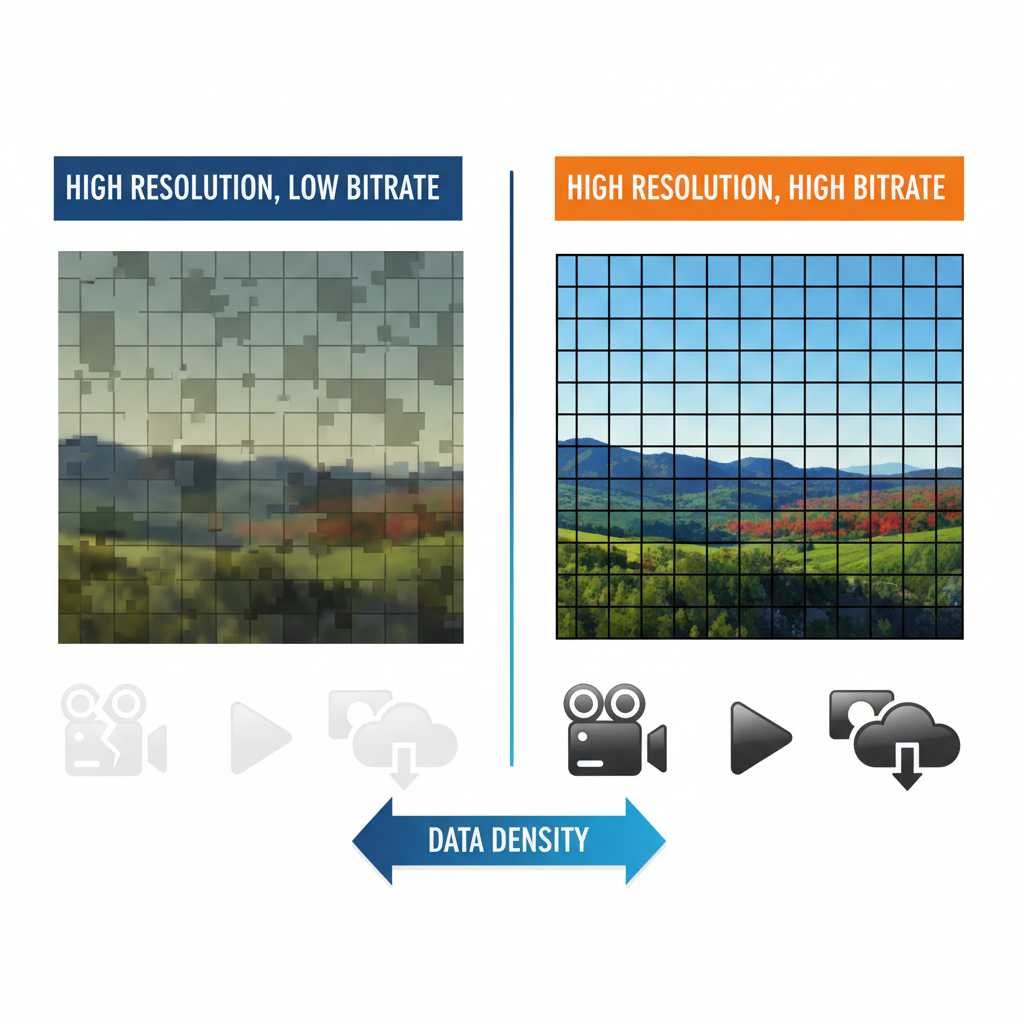
Bitrate, measured in megabits per second (Mbps), is the amount of data used to encode each second of video. It is the single most important factor determining video quality within a given codec.
- Low Bitrate: Leads to smaller files but introduces artifacts (macroblocking, blurring) because the codec has less data to work with.
- High Bitrate: Results in higher quality and larger files.
When using an efficient codec like HEVC, you can often achieve the same visual quality as H.264 but at a lower bitrate, demonstrating the power of modern video compression technology. Always consult the recommended bitrate guidelines for your target platform (e.g., YouTube suggests 35-45 Mbps for 4K H.264 uploads).
Frequently Asked Questions
What is the best universal video format?
The best universal video format is MP4 using the H.264 codec. This combination offers the highest compatibility across web browsers, mobile devices, and streaming platforms while providing excellent compression and quality.
What is the difference between H.264 and HEVC (H.265)?
H.264 is the older, more compatible standard, while HEVC (H.265) is the newer, more efficient standard. HEVC can achieve the same video quality as H.264 using roughly 50% less data, making it ideal for 4K and 8K content, though it requires more processing power.
Does a higher bitrate always mean better video quality?
Yes, generally a higher bitrate means better quality, but only up to a certain point (the 'sweet spot'). Once the bitrate exceeds what the video content and resolution require, the quality gains become negligible, and you are simply creating unnecessarily large files. The required bitrate also depends heavily on the efficiency of the video compression codec being used.
What is the purpose of an intermediate codec like ProRes?
Intermediate codecs like ProRes or DNxHR are used primarily in professional video editing. They are designed to be less compressed than delivery codecs, meaning they preserve more color and detail information. This makes them easier for editing software to process quickly without significant quality degradation during multiple editing passes.
Conclusion
Navigating the world of video formats, containers, and codecs can seem daunting, but mastering these fundamentals is essential for anyone serious about digital content creation. Remember the core concept: the container is the wrapper (.MP4), and the codec is the compression engine (H.264 or HEVC).
By selecting the appropriate codec for efficiency (like HEVC for 4K) and the right container for compatibility (like MP4 for the web), you ensure your audience receives the best possible viewing experience while keeping your bandwidth and storage costs manageable. Keep experimenting with bitrates to find the perfect balance between quality and size for your specific needs.
Ready to Optimize Your Content?
Start applying these principles today. Review your current export settings and see how switching to a more modern codec or optimizing your bitrate can transform your workflow and the quality of your delivered content. If you found this Video Format Guide helpful, share it with your fellow creators!